Shopify Article Tags 同步失败?
在一次Blog迁移过程中遇到的问题 :
将 Store A 的 article 迁移到 Store B 的时候, 我使用 Articles GraphQL Admin 批量获取博客文章,但是后续发现大量的文章 tags 没有同步到 Store B, 在A后台确实能够查询到这些tags, 最后排查之后发现问题出现在使用 articles 查询的时候就没有将正确的 tags 返回。
可以看到第二个箭头所指的 tags 缺失了:
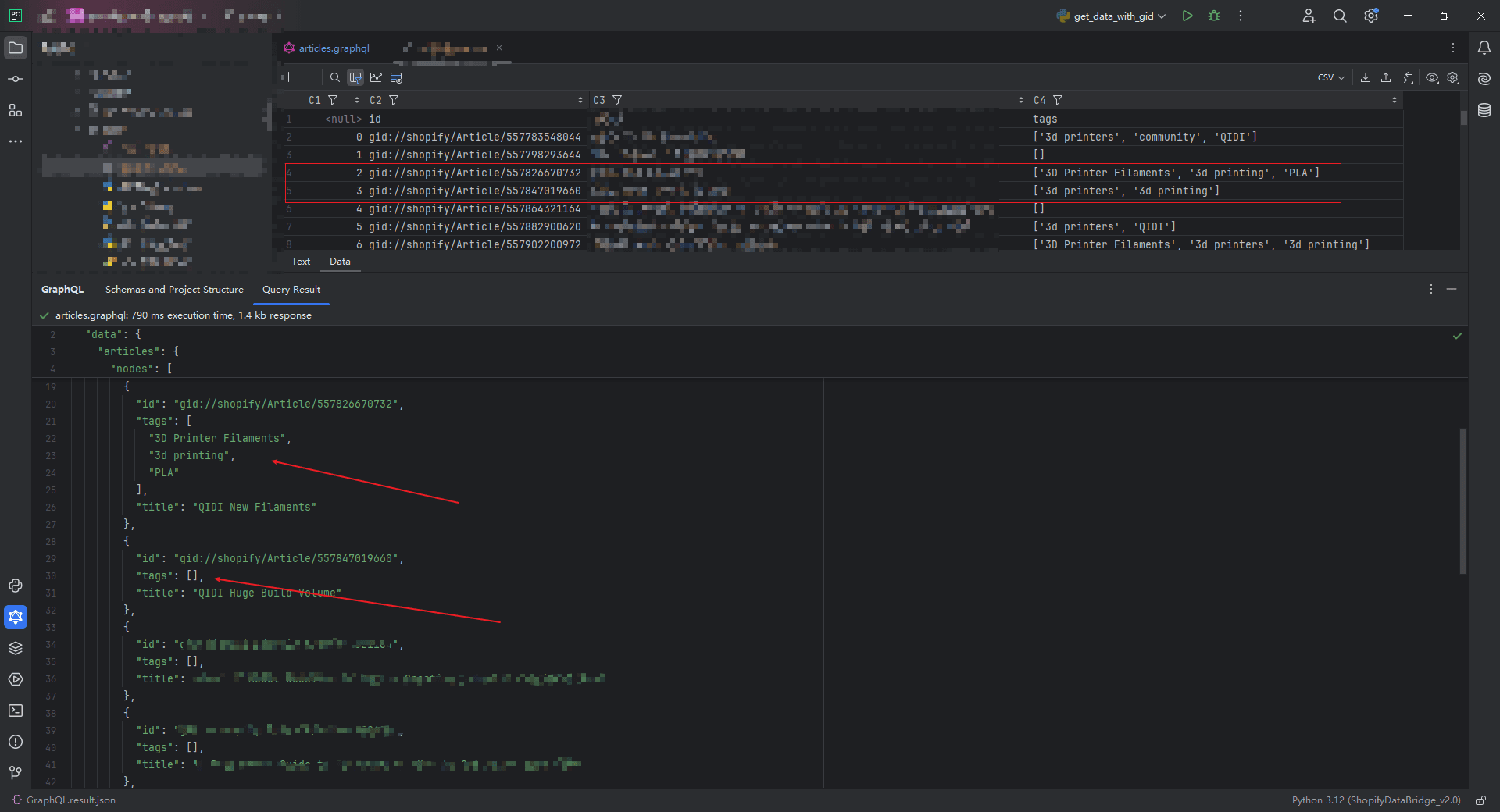
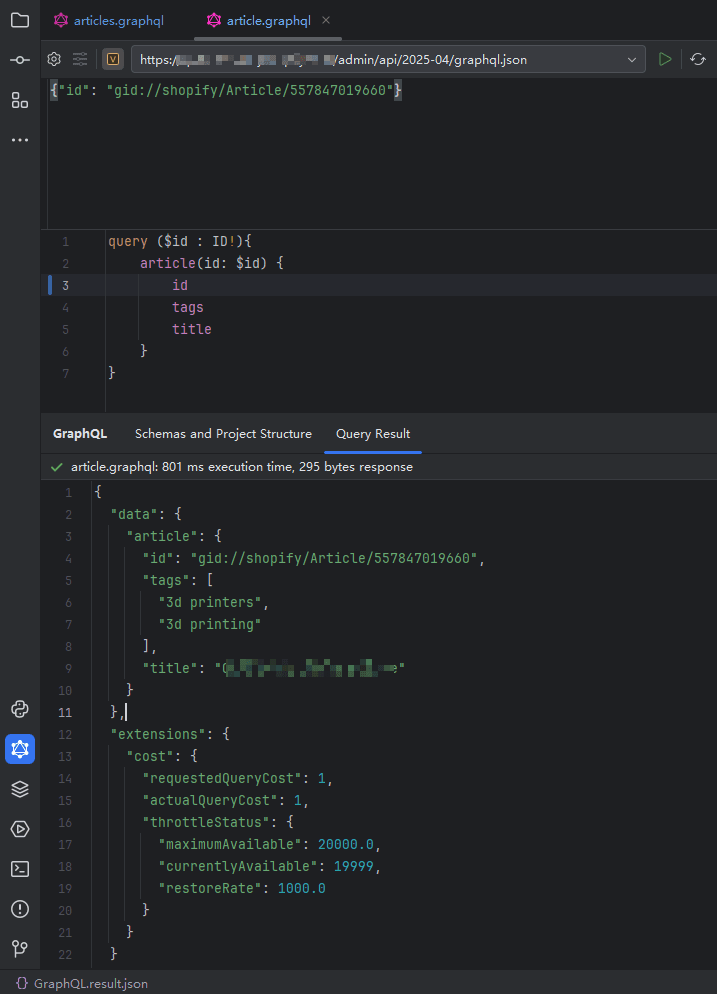
上图的批量查询的具体语句是:
{
    articles (first: 10){
        nodes{
            id
            tags
            title
        }
    }
}
即使每页只查询10个 也是如此, 继续减少到5个 也会出现
而且可以看到并不是每个都查询不出来 出现问题的article是不固定的 甚至出现本来的三个tag返回了两个的情况。
另外,当我添加不同的返回字段,即使是占据很大内容的body字段 也可以正确的返回 只有tags 字段出现问题 因此排除是内容过大问题
我将问题抛给 shopify 的AI工具,他认为是api 限速的问题 并说明这是个 an known issue .
“This is a known issue that can occur when querying multiple articles at once using the Shopify Admin GraphQL API, especially when requesting fields like tags. The problem is likely related to query complexity or internal API limits, which can cause some fields to be omitted or incompletely resolved when fetching larger result sets.”
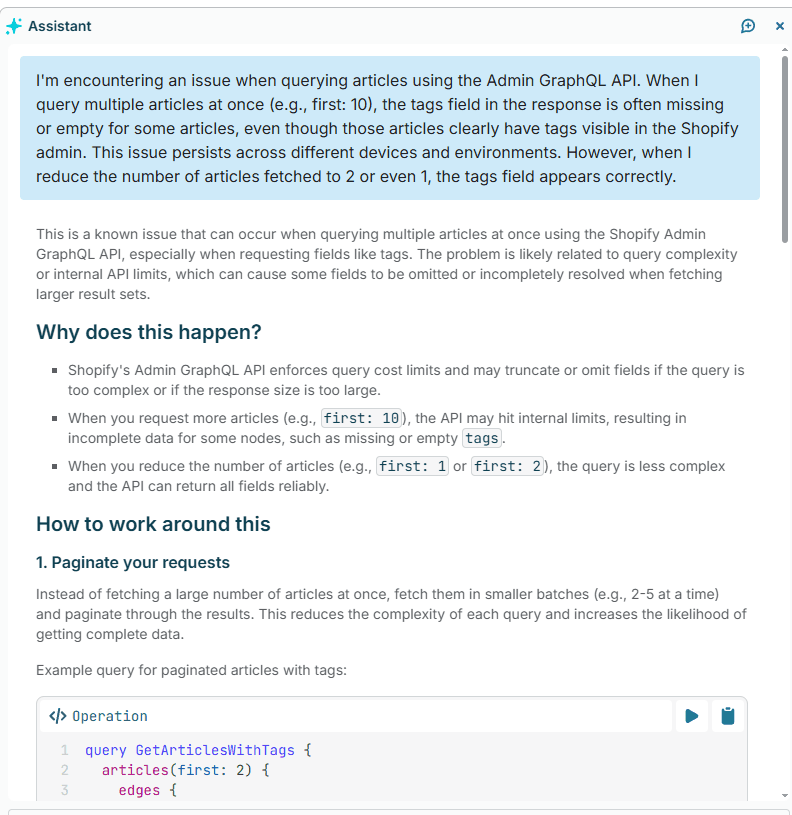
Assistant(shopify 官方的ai助手) 认为 这个问题可能与查询复杂度或内部 API 限制有关,这会导致在获取较大的结果集时某些字段被省略或未完全解析。
所谓 larger result sets , 即使是在 每页五个 只返回三个字段的情况下 也会出错??
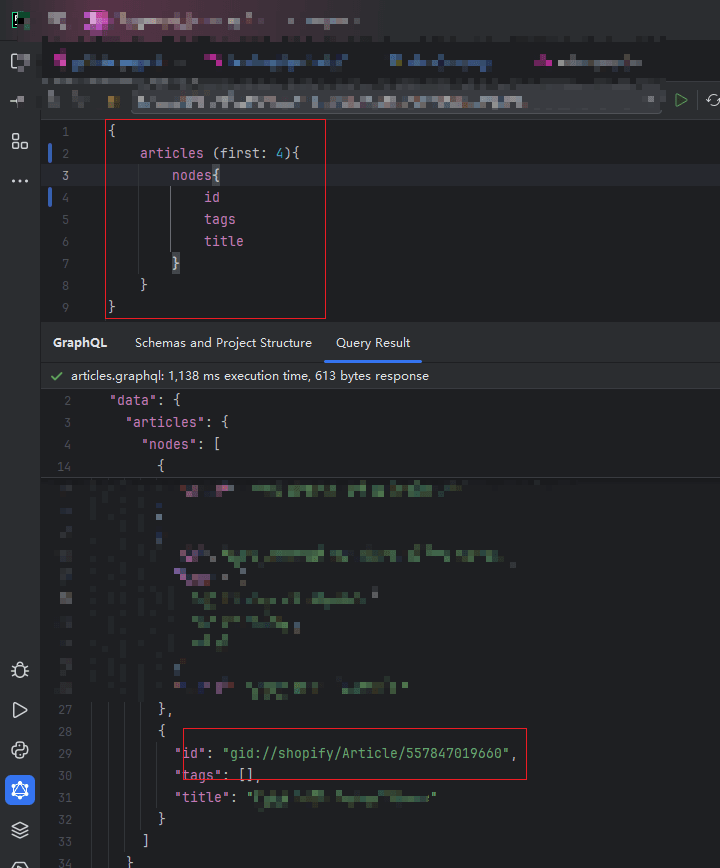
显然 shopify 的底层数据结构中 查询复杂度对于tags字段更加敏感 ,动辄非常长的body html 并不会出错 其他字段也不会出错,只有tags特殊
我猜:
考虑下面的查询 几乎涵盖了 article 的所有字段 , 我在实际的迁移过程中 其实就是使用的这个查询 一次查询了近 150 篇 article, 只有 tags 出现缺失的问题


其他的字段与tags的区别在于 tags 是一个数组的返回 猜测其表结构应该是 tags表 和绑定表 或者是使用了其他的优化层 因此这可能涉及到至少三张表关联的查询,而其他字段 例如 author blog metafields 等应该是通过各自的id直接连接(chatGPT说 shopify的底层数据库虽没有公开 但有工程师透露就是mysql) 我不理解即使是表的关联也不应该出现缺失的情况 可能有必要去详细的了解下shopify所谓的api限速的具体实现方法。或者shopify使用了mysql之外的缓存的办法去获取tags 可能觉得join多表太慢了 直接就没有做 从某个缓存中取值 而当一个个查的时候才会去join表来准确的查询??
{
    articles (first: 250){
        nodes{
            author{
                name
            }
            blog{
                title
            }
            body
            handle
            image{
                altText
                url
            }
            isPublished
            publishedAt
            metafields(first:5){
                nodes {
                    key
                    namespace
                    value
                    type
                }
            }
            summary
            templateSuffix
            tags
            title
        }
    }
}
以下是ai给出问题的可能原因:
-
Shopify's Admin GraphQL API enforces query cost limits and may truncate or omit fields if the query is too complex or if the response size is too large.
Shopify 的 Admin GraphQL API 会强制执行查询成本限制,如果查询过于复杂或响应大小过大,可能会截断或省略字段。
-
When you request more articles (e.g., first: 10), the API may hit internal limits, resulting in incomplete data for some nodes, such as missing or empty tags.
当你请求更多文章(例如, first: 10 )时,API 可能会达到内部限制,导致某些节点数据不完整,例如缺少或空的 tags 。
-
When you reduce the number of articles (e.g., first: 1 or first: 2), the query is less complex and the API can return all fields reliably.
当你减少文章数量(例如, first: 1 或 first: 2 )时,查询会更简单,API 可以可靠地返回所有字段
(Assistant 还建议我使用分页 每页2-5个, 第二个方案是 Use Bulk Operations for Large Data Sets 并轮询等待结果[还没有用过])
经过我不断测试 如果想要保证tags的正确 每页的数量是1的时候才行,或者拿 article id 单独查询一次。
后续批量获取shopify 数据就改为每页1个,附上遍历shopify数据的小封装(python) , 可用于数据迁移等脚本,适合少量数据 例如产品 博客 用户等迁移
def get_graphql_query(file_name):
    """
    从当前文件的相同目录下寻找指定名称的GraphQL文件,并读取其中的查询语句。
    :param file_name: 要寻找的GraphQL文件名(不包含扩展名)
    :return: 文件中的查询语句(字符串)
    """
    # 获取当前文件的目录路径
    current_dir = os.path.dirname(os.path.abspath(__file__))

    # 构造文件的完整路径,注意路径的处理
    file_path = os.path.join(current_dir, "..", "resources", "gql", file_name+".graphql")

    # 检查文件是否存在
    if not os.path.isfile(file_path):
        raise FileNotFoundError(f"文件 '{file_name}' 在当前目录中不存在。")

    # 读取文件内容
    with open(file_path, 'r') as file:
        query = file.read()

    return query


class EnvLoader:
    def __init__(self, env_file: str):
        if not env_file.endswith('.env'):
            env_file += '.env'
				# 注意env文件路径
        env_file_path = os.path.abspath(os.path.join(os.path.dirname(__file__), "..", "envs", env_file))
        print(f"Loading env file from {env_file_path}")

        if os.path.exists(env_file_path):
            dotenv.load_dotenv(env_file_path, override=True)
        else:
            raise FileNotFoundError(f"Could not find env file, Path: {env_file_path}")

        HOST = os.getenv("HOST")
        X_SHOPIFY_ACCESS_TOKEN = os.getenv("X_SHOPIFY_ACCESS_TOKEN")
        API_VERSION = os.getenv("API_VERSION")

        if X_SHOPIFY_ACCESS_TOKEN is None:
            raise Exception("X_SHOPIFY_ACCESS_TOKEN environment variable not set")
        if API_VERSION is None:
            raise Exception("API_VERSION environment variable not set")
        if HOST is None:
            raise Exception("HOST environment variable not set")

        self.url = "https://" + HOST + "/admin/api/" + API_VERSION + "/graphql.json"
        self.headers = {'Content-Type': 'application/json', 'X-Shopify-Access-Token': X_SHOPIFY_ACCESS_TOKEN, 'Host': HOST}

        print("URL: " + self.url)
        print(f"Headers: {self.headers}")

    def get_headers(self):
        return self.headers

    def get_url(self):
        return self.url


class ShopifyDataLoader:
    """
    Shopify GraphQL 分页数据加载器。
    支持自定义数据路径(例如 ['products'] 或 ['blog', 'articles'])
    """

    def __init__(self, env: EnvLoader, query_gql: str):
        """
        初始化加载器
        :param env: 环境变量,包含 URL 和 headers
        :param query_gql: GraphQL 查询语句
        """
        self.env = env
        self.query_gql = query_gql

    def _get_data(self, after: Optional[str] = None) -> Tuple[list[dict], dict]:
        """
        执行一次 GraphQL 请求并提取 edges 与 pageInfo。
        :param after: 分页游标
        """
        payload = {
            "query": self.query_gql
        }
        if after:
            payload["variables"] = {"after": after}

        response = requests.post(self.env.url, json=payload, headers=self.env.headers)
        if response.status_code != 200:
            return [], {}

        data = response.json().get("data", {})

        return next(iter(data.values()), {}).get("edges", []), next(iter(data.values()), {}).get("pageInfo", {})

    def load(self) -> Iterator[dict]:
        """
        生成器:遍历所有分页数据,返回每个 node
        """
        items, page_info = self._get_data()

        while True:
            for item in items:
                yield item["node"]

            if not page_info.get("hasNextPage"):
                break

            after = page_info.get("endCursor")
            items, page_info = self._get_data(after)
# 需要配置两个文件,注意文件的路径 ,配置好一下面的方法调用即可 具体查询返回的参数和分页数量通过 grapql 查询控制
# 1 env
# 2 GraphQL 查询语句文件

/*

X_SHOPIFY_ACCESS_TOKEN='shpat_xxxxxxxxxxxxxxxxxxxxxxx'
HOST='xxxxxxxxxx.myshopify.com'
API_VERSION="2025-04"


query getAllArticle($after: String){
    articles (first: 1, after: $after){
        edges{
            node{
                id
                tags
            }
        }
        pageInfo {
            hasNextPage
            endCursor
        }
    }
}
*/
if __name__ == '__main__':

    loader = ShopifyDataLoader(
        env=EnvLoader("env-file-name"),
        query_gql=get_graphql_query("query-file-name")
    )

    for article in loader.load():
        print(article)